- role
- Product, specs, design, development
- period
- October 2026 · two days of building, Oct 12–13
- platform
- iPhone only, a single user
- stack
- Expo SDK 57, Tiptap, expo-sqlite + Drizzle · Next.js 16, Neon, Better Auth · Claude API
- in numbers
- 119 commits, ~34,000 lines of TypeScript, ~800 tests, 10 ADRs
01 · context
Why yet another notebook
Since 2024, I have been writing my notes in Notion: a few lines, a time, sometimes three times a day. It works as long as you have a network and do not try to read things back. I was then preparing a year of travel in Latin America: patchy network, changing time zones, shifting landmarks. Exactly the conditions where you most need to write, and those where Notion is the least reliable.
I wanted two things. To write anywhere, without ever waiting for the network. And to step back: read a week, a month, a year again, and see which states I went through, without rereading everything by hand.
That is where pensee comes from. An iPhone app, a single user, and a stance: everything is written on the phone first, and an AI rereads the notes once a week to draw a digest from them, the Recul (French for stepping back). The name comes from the flower, the pansy, “pensée” in French, which also means a thought; I write it pensee, without the accent, so that it travels.
Five principles, set before the first line of code
- Writing first.
Nothing slows typing down: no spinner, no cursor jump, no sync modal.
- Offline by default.
The phone is the source of truth. The server is a backup and an analysis engine.
- An honest look back.
The AI reads, it does not diagnose. It cites its sources, says “estimated”, and makes up neither figures nor quotes.
- Intimate, so protected.
An encrypted database, Face ID, a note excluded from the analysis in one gesture.
- Built to evolve.
The Recul will change often. The architecture must make those changes local, testable and reversible.
02 · product
What the app does
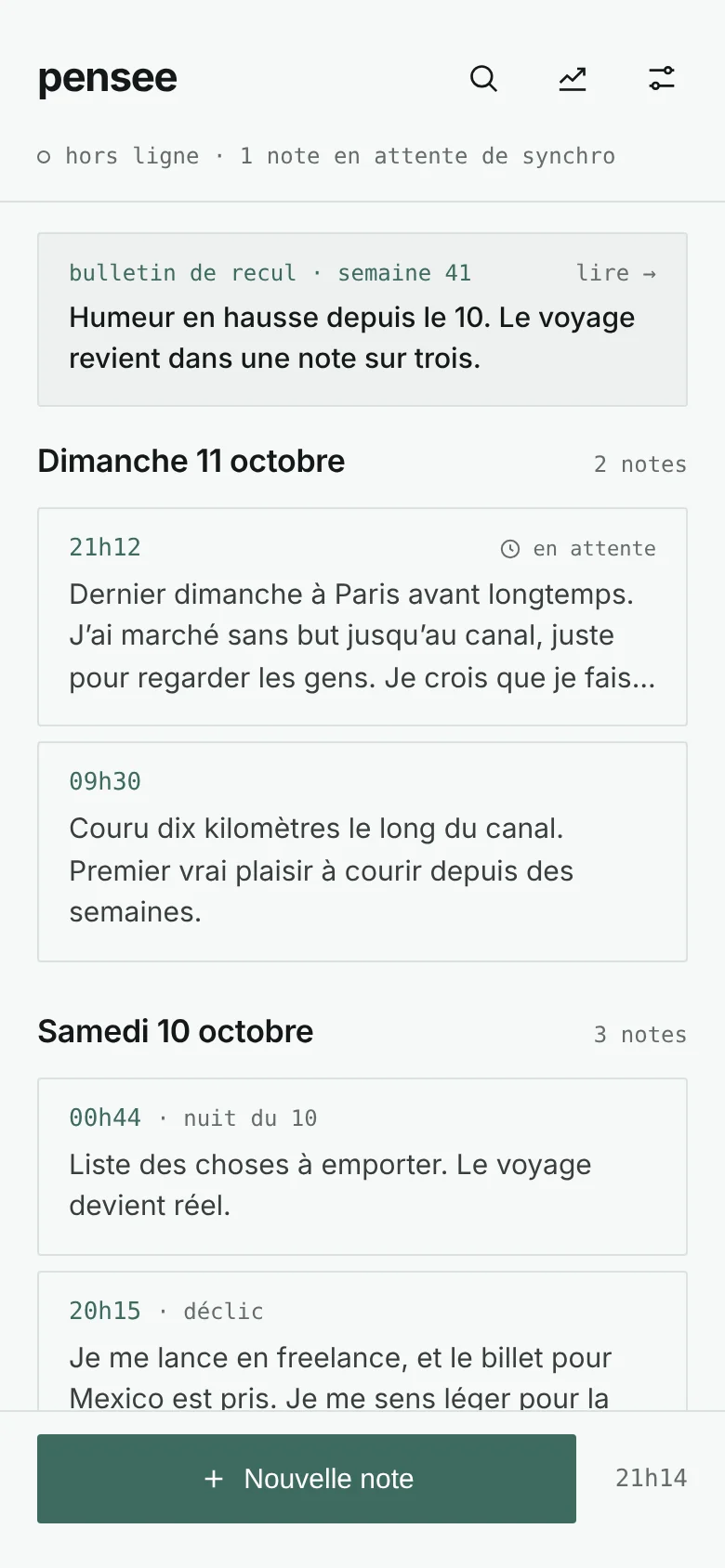
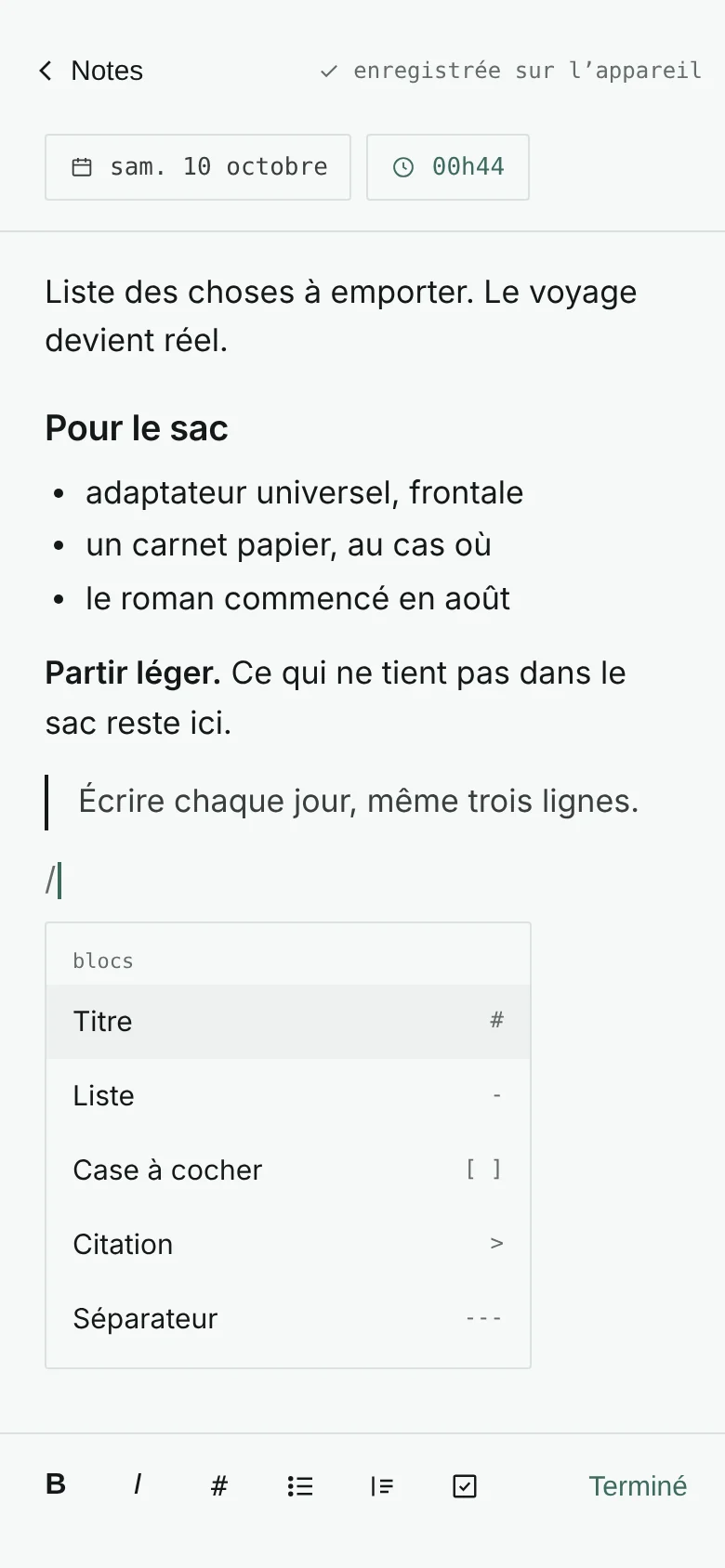
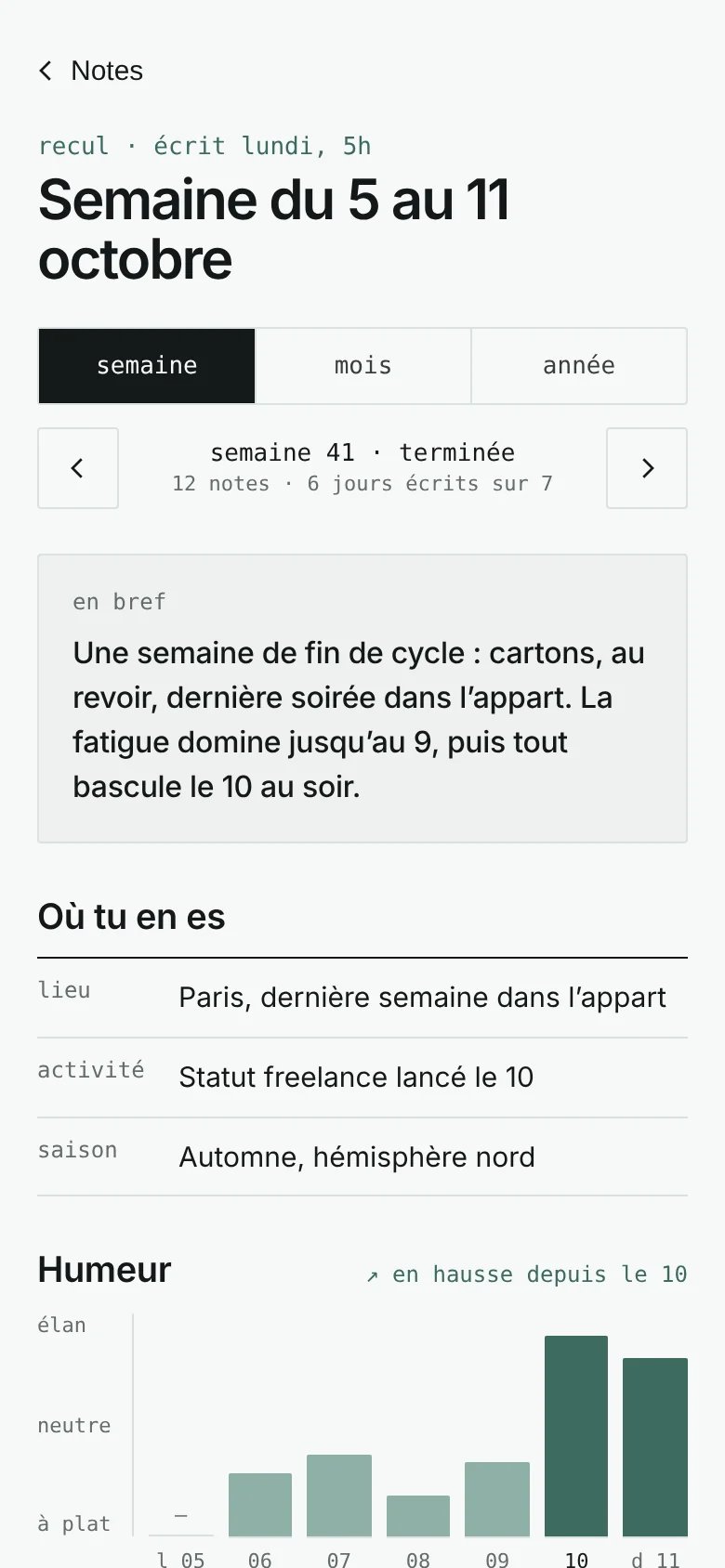
A note is rich text, a day, a time, and possibly a city. Four screens carry the essentials.
- notes
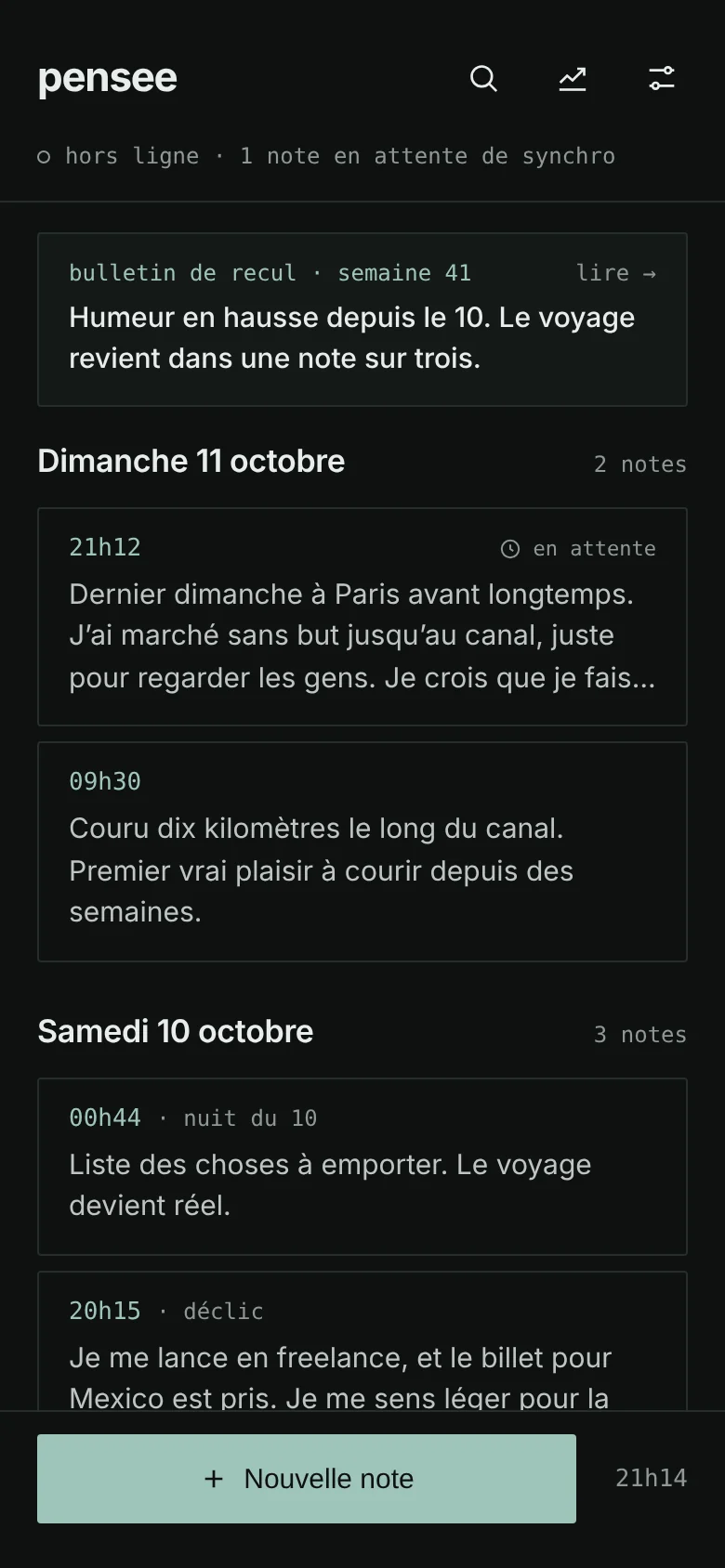
- Notes by day, the time first, each card cut at three lines to see several at a glance. At the top, the card of the latest digest, and a status line: “offline · 2 notes waiting”.
- editor
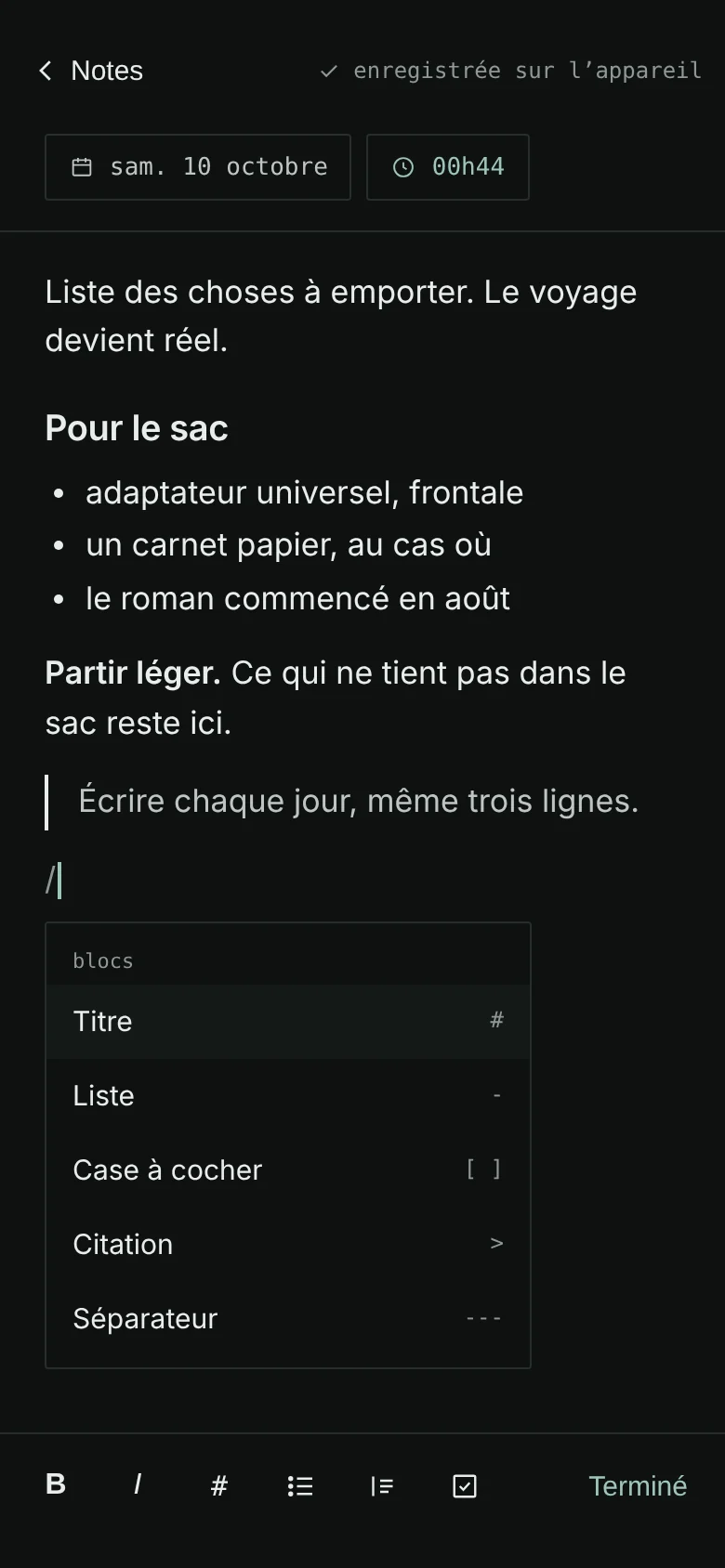
- Notion-style: headings, lists, checkboxes, quotes, a “/” menu and a formatting bar above the keyboard. The day and the time change in one gesture, the city comes from the GPS, offline.
- recul
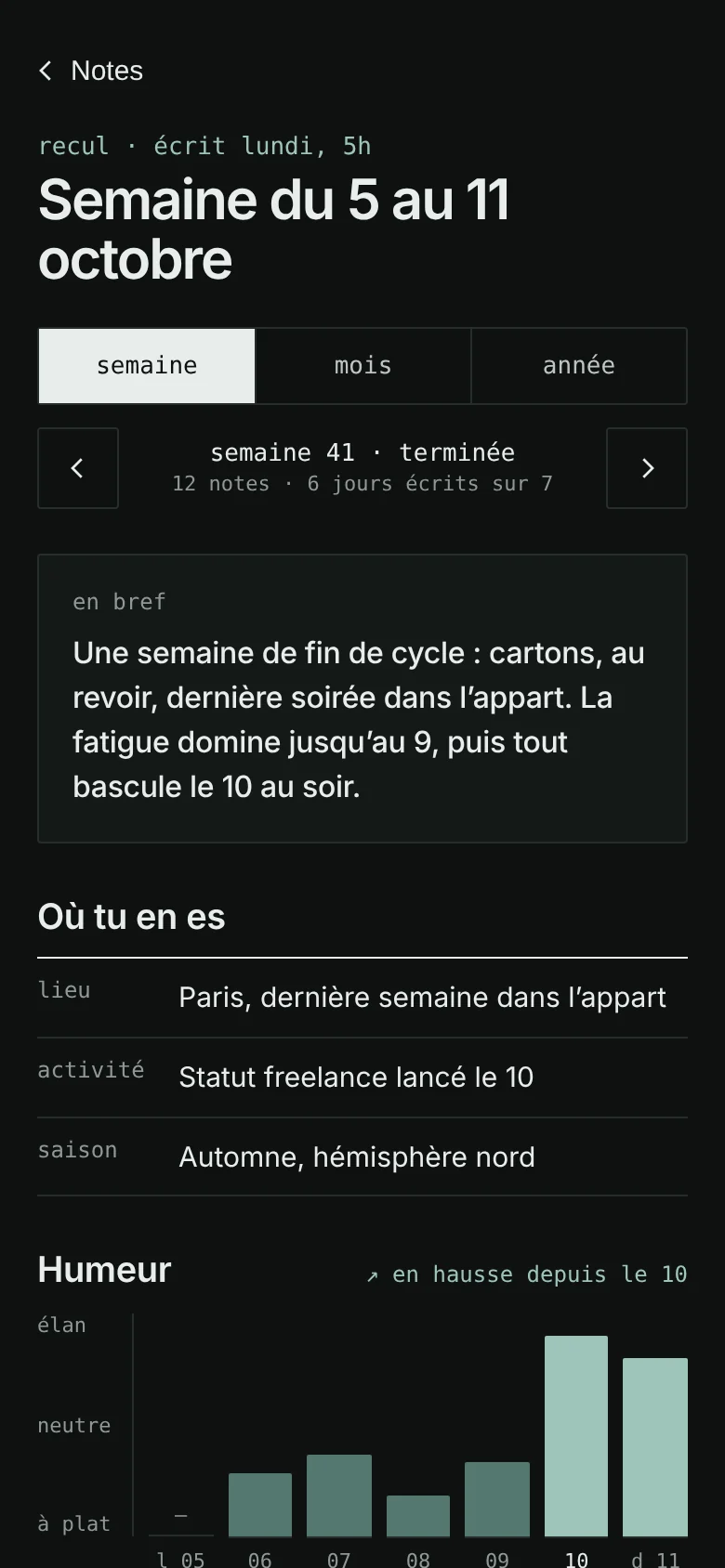
- The digest of the week, the month and the year: in short, estimated mood, writing moments, phases, what comes back, an excerpt to read again.
- sync
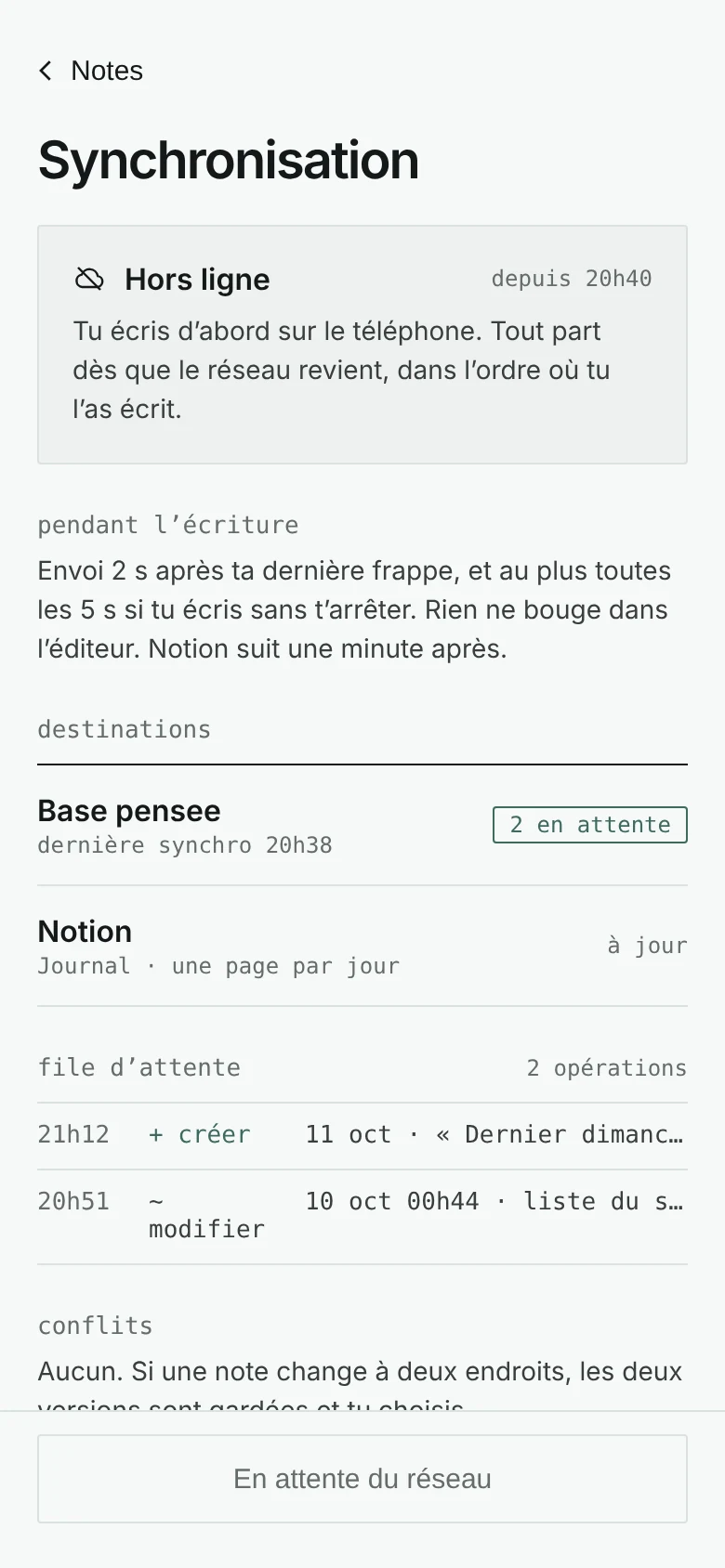
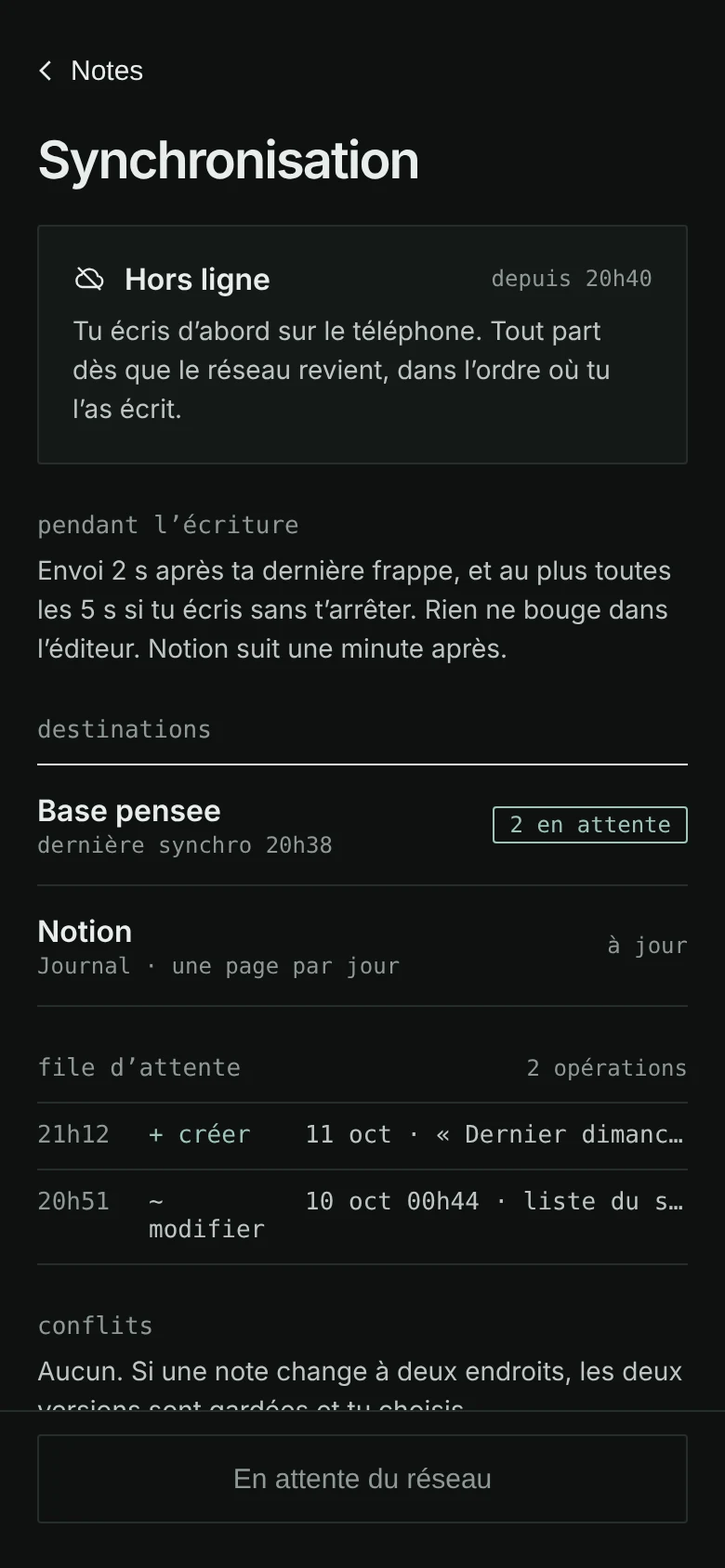
- What has gone, what is waiting, possible conflicts, and a “Wi-Fi only” setting for travel data plans.
On top of that come a full-text search that works offline (SQLite FTS5, highlighted words, filters by period and by place), settings, the export of every note to Markdown, and the import of my Notion history.
A note written at 12:44 am belongs to the day before: the app shows it under “night of the 11th”. A journal is read in days lived, not calendar days. This rule lives in a shared package, with the ISO week, months and seasons, and it is the same on the phone and on the server.
03 · architecture
The architecture
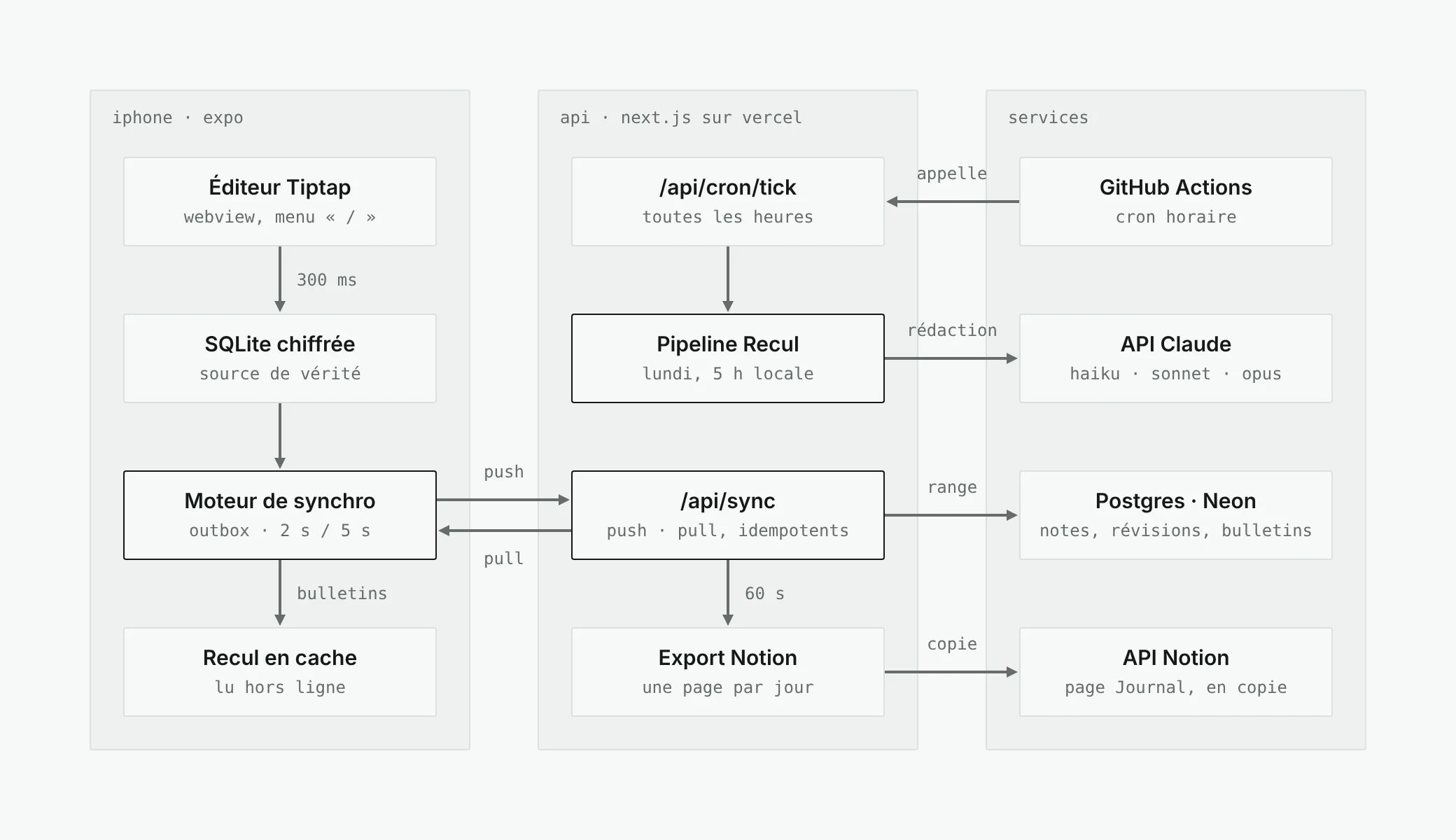
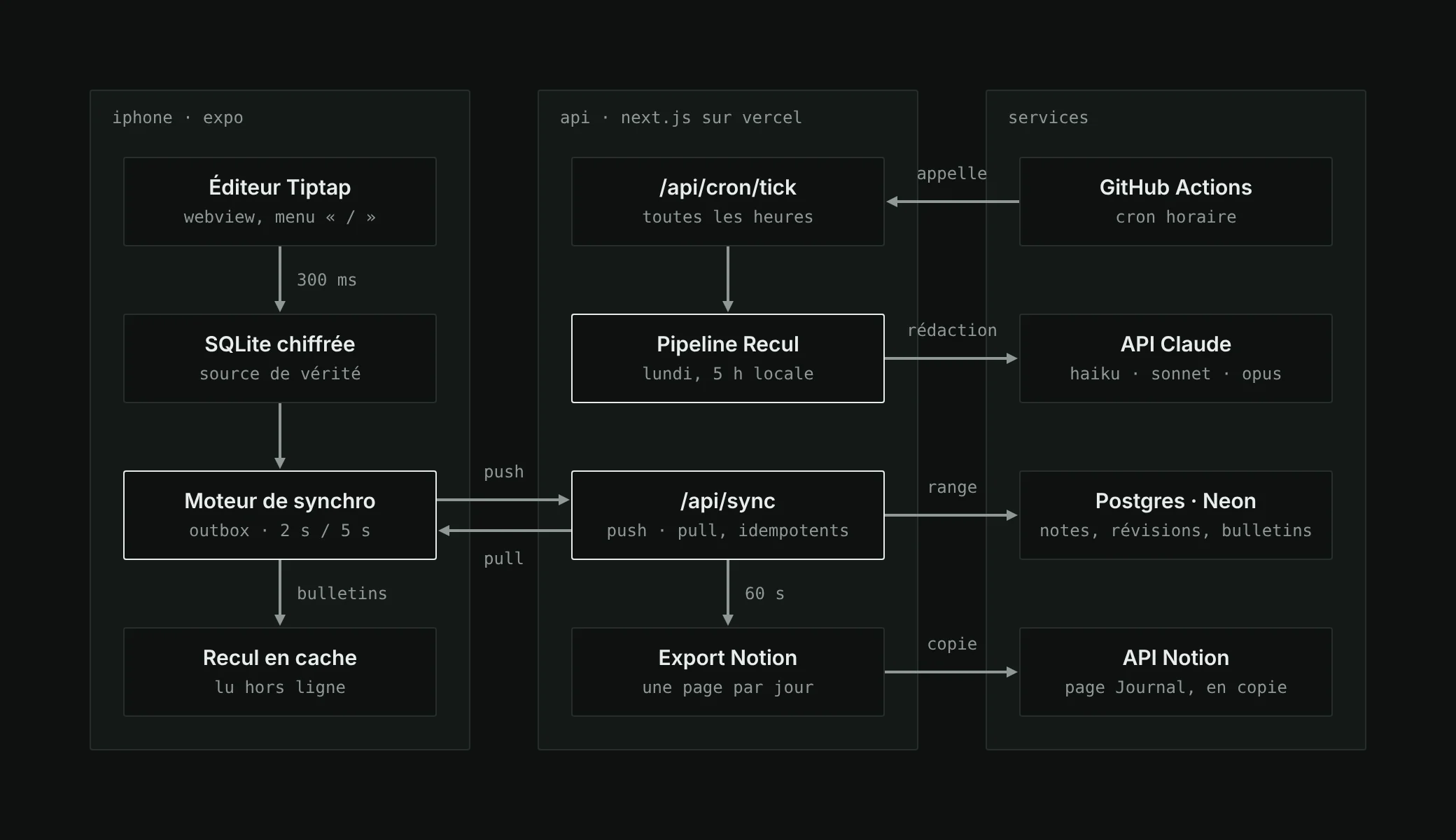
Two applications, one language. An Expo app on the phone, a Next.js API on Vercel, and between the two a sync contract written only once, as shared Zod schemas. The phone only talks to the API; the API talks to Postgres, to the Claude API and to Notion.
A monorepo, five packages
pnpm and Turborepo, strict TypeScript everywhere. Internal packages export their sources directly: Next compiles them, Metro and Vitest read them as they are, without a build step.
pensee/
├─ apps/
│  ├─ mobile/    Expo, Expo Router, encrypted SQLite, Tiptap editor
│  └─ api/       Next.js (route handlers), Neon Postgres, Better Auth
├─ packages/
│  ├─ core/      types, Zod schemas, dates, seasons, Markdown
│  ├─ recul/     AI pipeline, versioned prompts, validators
│  └─ e2e/       the phone's code against the real routes
└─ docs/         14 specs, 10 architecture decisions
The choices, and what they ruled out
Each structural choice has its ADR, a short file that states the context, the decision, the alternatives and their consequences. Here is the gist.
| topic | chosen | ruled out | why |
|---|---|---|---|
| App | Expo (React Native) | PWA, Swift | iOS can purge a PWA’s storage. Swift needs a Mac for every build. |
| Data | SQLite, a home-made outbox | PowerSync, Replicache, CRDTs | A single user: a simple, testable protocol is enough. |
| Editor | Tiptap in a WebView | 100% native editors | Real rich rendering, and an editor reusable as it is on the web. |
| Server | Next.js on Vercel, Neon | Supabase | The same tooling as my other projects. |
| Scheduling | Hourly tick from GitHub Actions | Vercel Cron | On the Hobby plan, a Vercel cron only runs once a day. The digest follows my time zone. |
| Sign-in | Code by email, bearer token, closed list | Password, OAuth | A journal for one person: nobody else should be able to open an account. |
Two more discreet decisions pleased me. No date library: Intl.DateTimeFormat and day arithmetic in UTC, the same code in Hermes and in Node. And the mobile database goes through a four-method interface, plugged into expo-sqlite in the app and into node:sqlite in the tests: the real SQL, FTS5 search included, runs in CI without a simulator.
04 · local-first
Writing without a network
The phone always writes locally first. The editor runs in a WebView; 300 ms after the last keystroke, it sends the document and its Markdown version back to the native side. The note is saved in SQLite, and in the same transaction, an operation is placed in an outbox.
This outbox is coalesced: it keeps a single pending operation per note, its latest full version. Writing for five minutes straight does not create sixty sends, but one at a time. The sending pace is a debounce with a ceiling: 2 s after the last keystroke, and at the latest 5 s after the first unsent change.
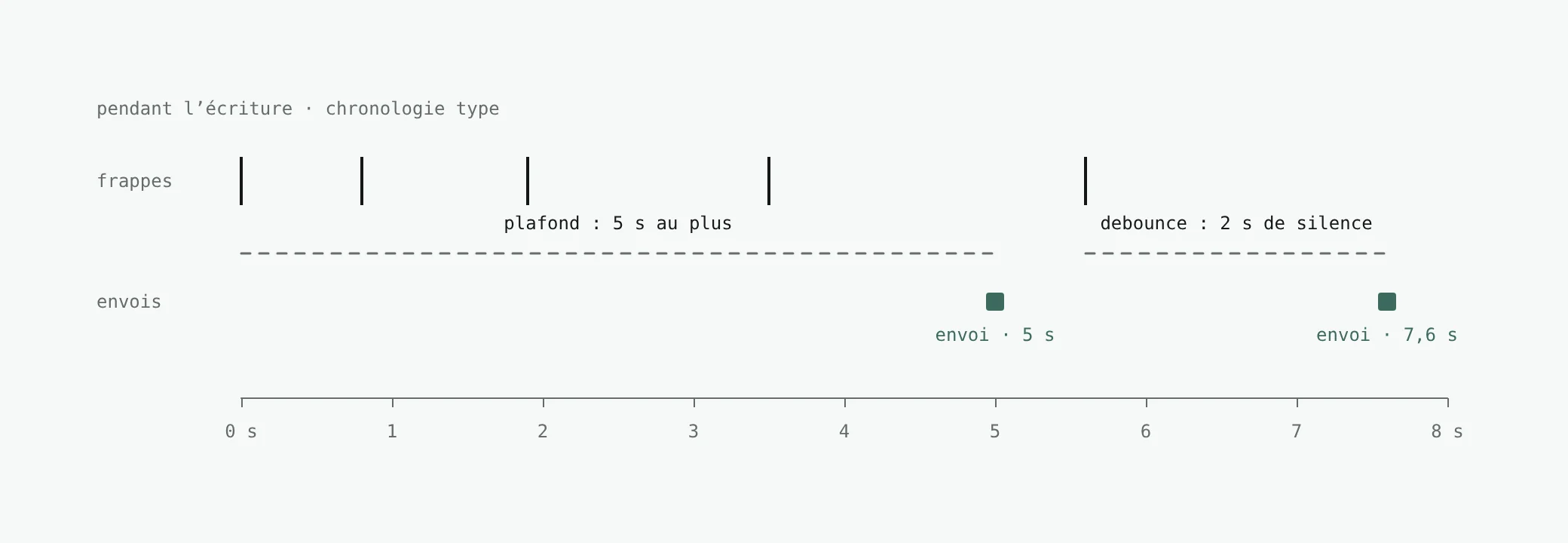
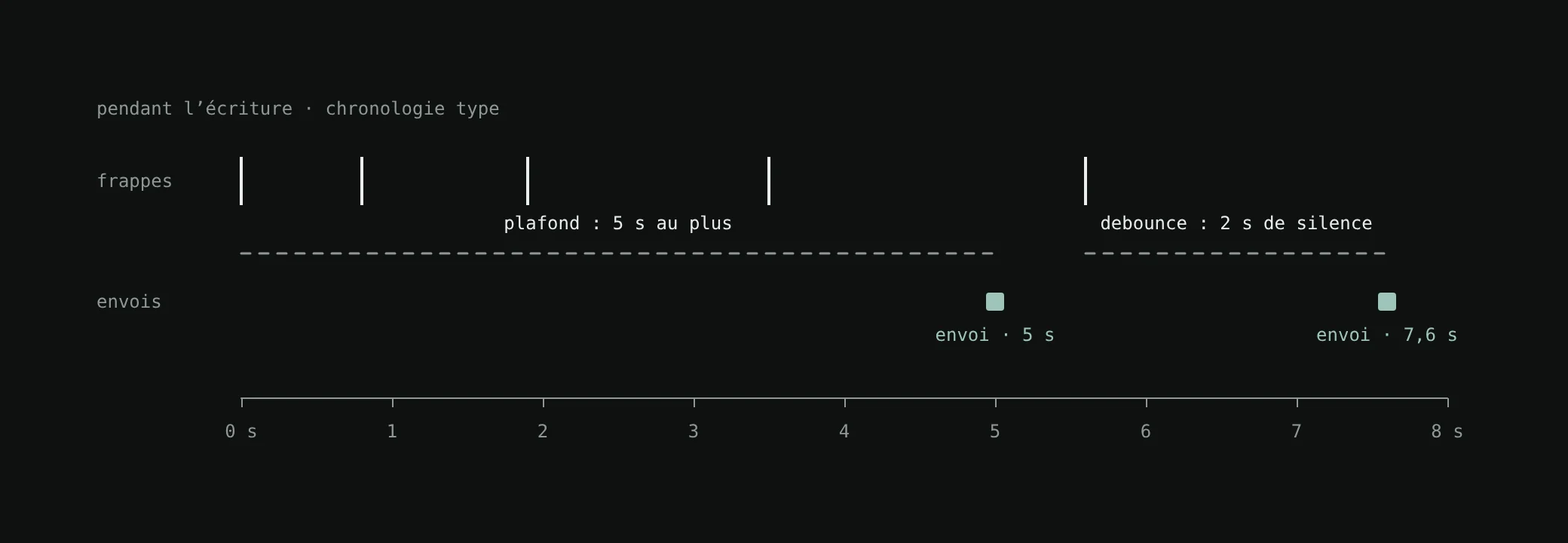
Offline, the scheduler tries nothing and logs no error: the outbox grows, which is normal. Everything starts again when the network comes back, when the app returns to the foreground, and in whatever background task iOS is willing to grant.
A two-route protocol
push sends the operations, each with an identifier for idempotency and the server revision it builds on. If that revision is the right one, the server accepts and increments. Otherwise, it overwrites nothing and sends back its version. pull brings back everything that changed since a cursor, digests included, except for the open note: its changes wait until it is closed.
In case of a conflict, both versions are kept and the choice is offered to me when the note is closed, never while typing: keep mine, the other, or both. No CRDT, on purpose.
In a private journal, a silent merge is worse than a question.
Notion, as a readable copy
I wanted to keep my notes readable in Notion. The Notion API handles about three requests per second: no way to follow it at typing pace. The server queues each modified day, 60 s after the last change, then rewrites that day’s page in full. A hash of the content avoids sending an identical page, and a page can never be duplicated. It only goes one way: pensee to Notion, never the reverse.
05 · ai
The Recul: an AI that rereads a journal
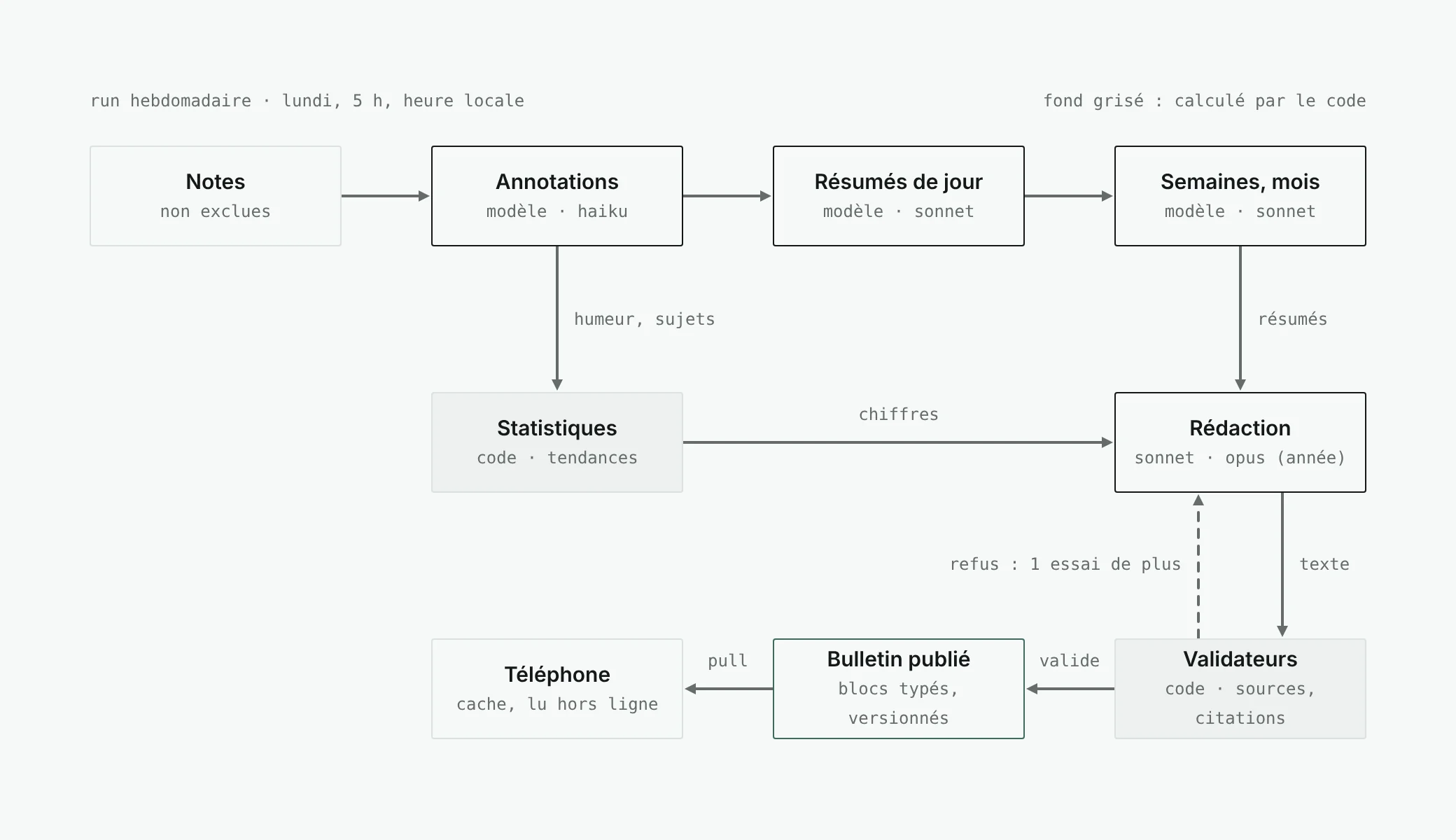
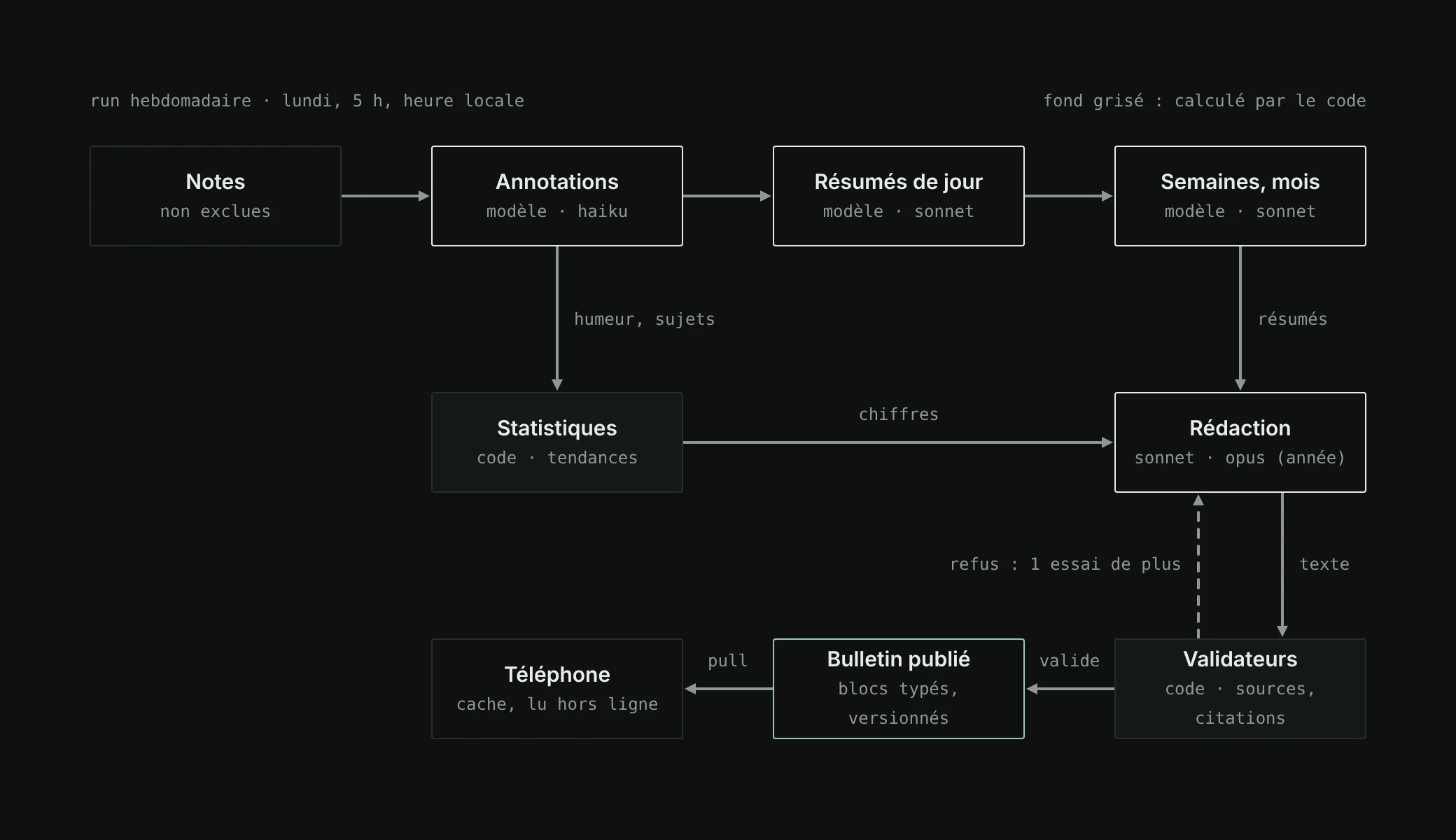
It is the heart of the project, and the part that will change the most. Every Monday at 5 am, the phone’s local time, a pipeline rereads the week’s notes and writes three digests: the past week, the month, the year. The time zone is sent with every sync: the Recul follows my time zone changes.
At first, it ran every night. The estimate, about $0.30 a day of which more than half went to rewriting the year’s digest, made me switch to once a week: around $0.35 a week. These are estimates. An “Update the recul” button is still there for a mid-week digest.
The figures come from the code, the words come from the model.
Building in layers
Each note is first annotated by Haiku: mood estimated between −1 and 1, topics, activities, sensitive passages. Sonnet then summarises each day, then the weeks and the months. The digests are written from these summaries, the statistics and the context (place, season), with Opus taking care of the year. Each layer is stored and versioned; a hash of the inputs avoids calling the model again when nothing has changed.
Rules checked by the code
- The figures come from the code.
Counts, averages, trends are computed in TypeScript. A validator refuses any number written by the model that does not exist in the statistics provided.
- Trends are detected, not invented.
Pure detectors (mood swing, volume, time of day, topics) suggest candidates; the model chooses and phrases, it does not create any.
- Every claim is sourced.
Phases and patterns carry the identifiers of their notes, checked: existing, within the period, not excluded.
- Quotes are exact.
An excerpt in quotation marks must be a substring of the note, otherwise it is refused.
- Read, do not diagnose.
No clinical vocabulary, no unrequested advice. The mood is “estimated, read in the words”. Sensitive passages count in the figures but are never quoted.
- A gap stays a gap. Too few notes? The block says so, rather than filling in.
If an output fails the validators, the model gets a single new attempt, with the list of its errors. On the second failure, the previous version of the digest is kept, or failing that only the computed blocks. Outputs are structured (a JSON schema enforced by the API), the fixed part of the prompt is cached, and each prompt carries its version.
A digest is a list of blocks
Each block has a type and a version. Some are computed (mood, writing moments, topics), others are written (in short, phases, patterns, to read again). The layout per scale is a separate configuration: a block can be reordered or hidden without touching the prompt.
{
  "scale": "week",
  "periodKey": "2026-W41",
  "pipelineVersion": "recul@1.0.0",
  "blocks": [
    { "type": "summary", "v": 1 },
    { "type": "mood_chart", "v": 1 },
    { "type": "phases", "v": 1 }
  ]
}
The app cleanly ignores a type it does not know, and a generic Markdown block makes it possible to try an idea without a new version of the app. One last block never goes through the model: if a note expresses strong distress, the digest shows a sober message and help resources for the country I am in.
My first real digests only showed figures. The fallback to computed blocks was doing its job, but silently: neither the screen nor the logs said why the text was missing. Every digest now carries its reasons, a line under the digest made of field names and codes, never a word from a note. A silent fallback is an experience bug.
06 · import
Two years of Notion to bring home
A notebook that steps back without my history would not have had much to reread. My notes since 2024 live in Notion subpages, one per year or per period, and they had to come into pensee as if they had been written there: dated, attached to their day, synced, then analysed.
The parser reads the blocks of the Notion API, not a Markdown export: bold is reliable there, and it is often what marks the time. It had to deal with two writing eras.
- 2024–2025
- Days in English (“Tuesday 31 December”), the time alone in a bold paragraph, times often in decreasing order, monthly reviews slipped between two days.
- 2026
- Days in French, the time at the start of the paragraph (“10h24 :”), sometimes with a label, times in increasing order.
Day titles almost never carry the year: it is deduced from the subpage title, “2024” or “janvier 2026 → octobre 2026”. When a title gives the day of the week, it serves as a check; if it does not match, the app flags an anomaly and suggests the closest date that fits. The parser tolerates one typo per word: “Thuesday” is still a Tuesday. Anomalies are settled in the app, one by one, before anything is written.
Reading proceeds in slices of four minutes at most, each in an ordinary request. Each batch of a hundred blocks is saved in the same transaction as the Notion cursor of its page: a cut only loses the current batch. A lease guarantees a single reader, and the hourly tick carries on with the import when the app is closed.
The analysis of this history does not go through the Monday run. I start it by hand, in batches of 50, 200 or 1,000 notes sent to Claude’s Message Batches API, half the price: the estimated cost is shown before sending, the real cost after.
07 · privacy
Intimate, so protected
Every technical decision is judged against one question: what happens if this phone is lost, if this server leaks, if this error log is read?
- An encrypted database on the device
with SQLCipher. The key, 32 random bytes, stays in the iOS keychain, never copied to iCloud or to another device.
- Face ID
on opening and after five minutes in the background, preview hidden in the app switcher.
- Logs without content.
Identifiers, counters, durations, error codes. A test checks that the logger strips every text field.
- Every route filtered by user.
A test reads the route files and fails if one of them forgets the guard.
- A note excluded with a long press
is never sent to the model again. Notifications stay generic, the location is rounded to one kilometre.
- No real note in the repo.
The tests run on invented weeks, written to cover the hard cases.
The trade-off is accepted: no end-to-end encryption. A blind server could not run the Recul. For a single-user tool, a trusted server is enough; if the app opened up to others, it would be the first decision to reopen.
08 · method
Building from a phone
I wanted to be able to run this project without a computer: a code editor on my phone, GitHub for the code, Vercel and EAS to build in the cloud. That imposed a method.
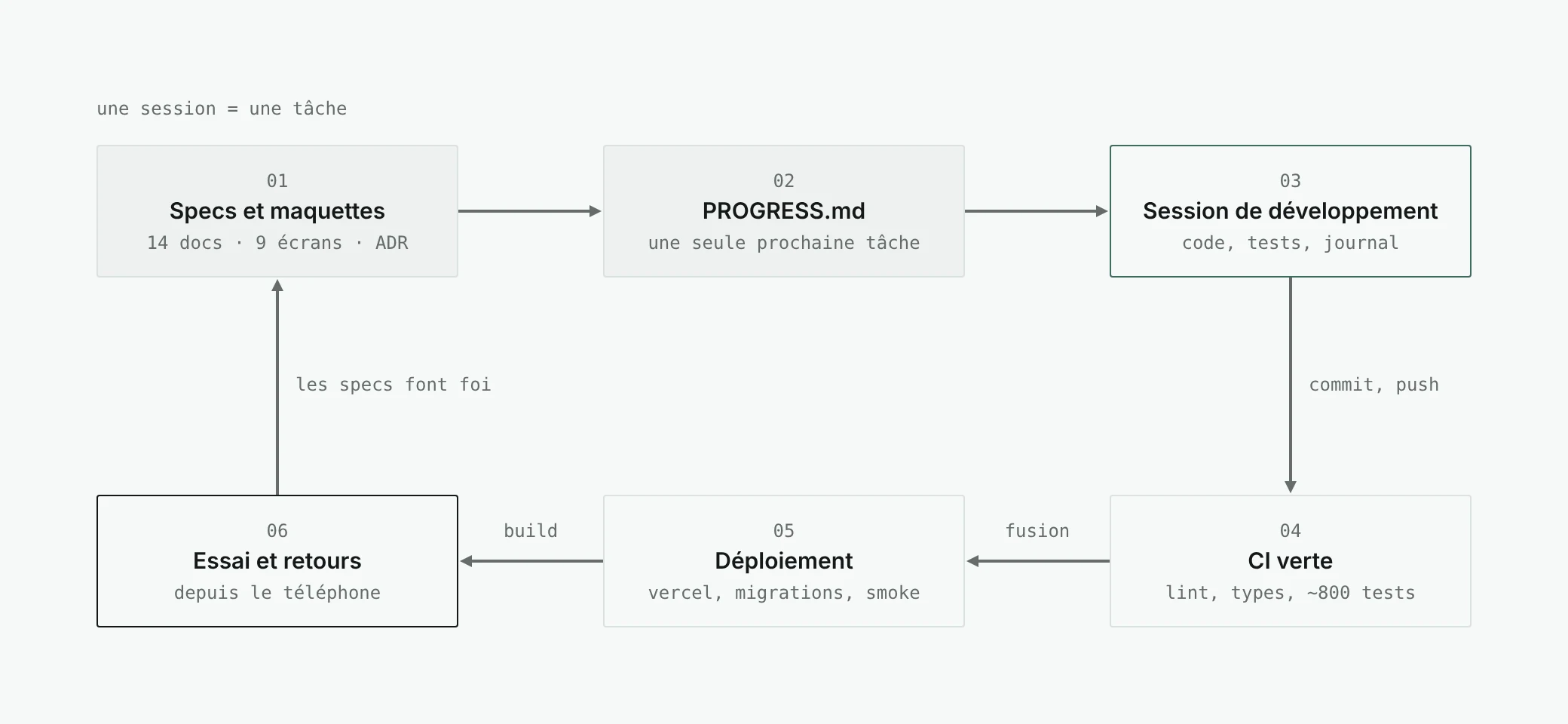
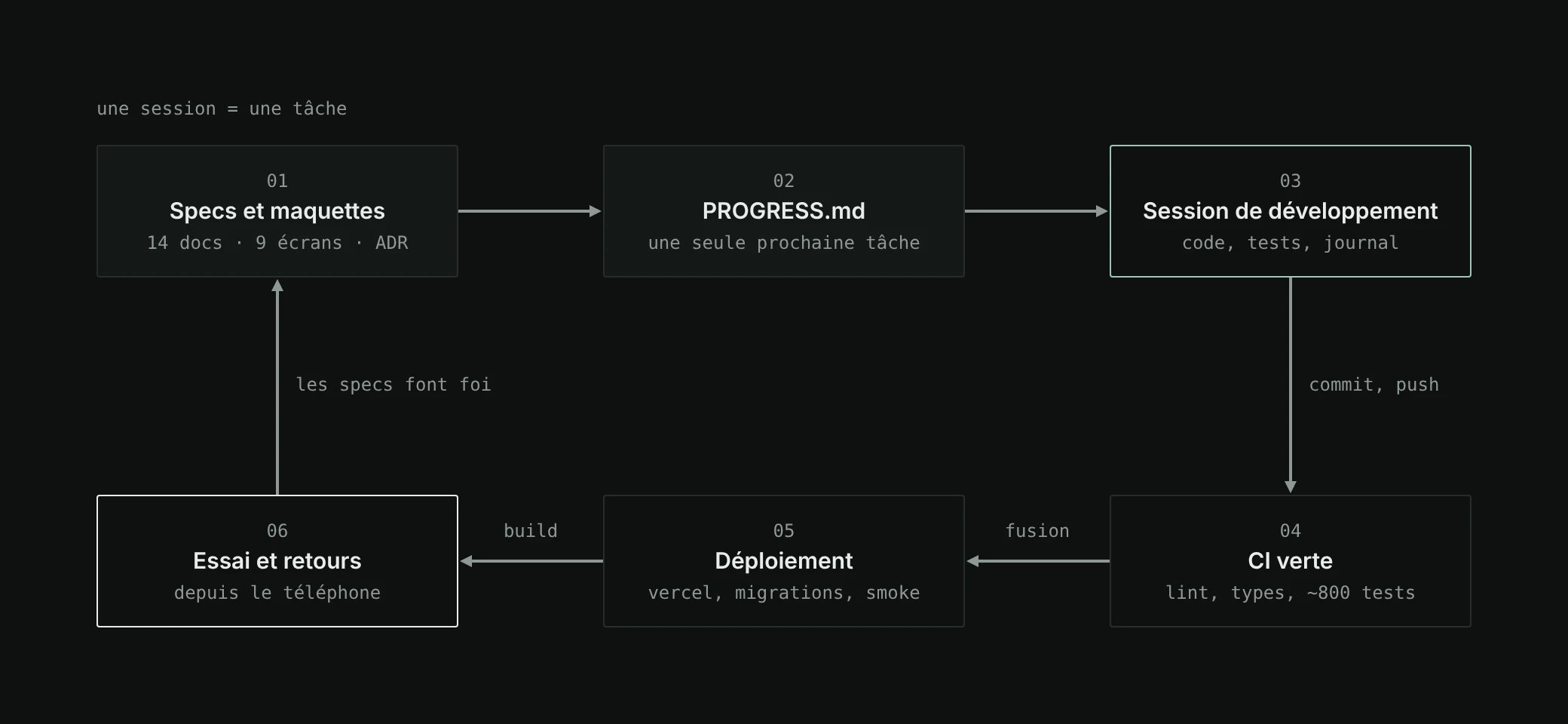
Specs first, before the slightest line of code. Fourteen documents: vision, architecture, data model, editor, sync, Recul, design system, screens, security, tests, deployment, a roadmap in ten milestones, import. Then the mock-ups, nine screens in day and night mode, drawn with my visual identity. Then two files that hold everything together: the working rules, and PROGRESS.md, the restart point.
Each working session starts from PROGRESS.md and the task it points to, and ends by updating the log: what was done, the verification commands and their result, what was not verified, and a single next task, precise enough to be picked up cold.
- 2 days
- 119
- ~34,000
- ~800
- 10
Tests that replace the simulator
Without a Mac at hand, the tests are my eyes. Vitest for the packages and the API (an in-memory Postgres with PGlite), Jest for the app, an end-to-end package that runs the phone’s real code against the API’s real routes, and nine Maestro journeys for the screens. One test even checks that every button has a label and a target of at least 44 pt: it found a 31 pt native switch.
My role: try, report, arbitrate
Tools speed up writing the code; the decisions remain mine. The pace of the Recul, its cost, what Notion should receive, what really matters. And the feedback from trying it, reported as it is.
- “I’m not notified, I don’t know how long it takes, I can start the same one again.”
- The update route answered at the end of the run, up to five minutes, while the phone gave up after twenty seconds. It now answers right away, refuses a duplicate, and the screen follows the run with a clock: “Updating · 1:07”.
09 · takeaways
What I take away
- A precise spec is better than a long explanation.
It can be reread, corrected, and serves as a contract for each session.
- Write down what is not verified.
It is the most useful line of the log: it says where to look on the first try.
- Separating figures and words makes an AI verifiable.
The model writes, the code counts and checks.
- The job is shifting towards arbitration.
Choosing, deciding between cost, comfort and trust: the bridging role I like to play between teams, played this time between the product and its technology.